Transactional Entries
In Accountinite, transactions are a special type of entry. These are entries that change an Account's balance.
The following are transactional entries in Accountinite
- Sales Invoice
- Purchase Invoice
- Payments
- Journal Entries
States of a Transactional Entry
A transactional entry goes through the following states
| # | State | In Database | Editable | In Analytics |
|---|---|---|---|---|
| 1 | Draft | No | Yes | No |
| 2 | Saved | Yes | Yes | No |
| 3 | Not Saved | No | Yes | No |
| 4 | Submitted | Yes | No | Yes |
| 5 | Cancelled | Yes | No | No |
| 6 | Deleted | No | No | No |
Check the sections below on more details about these states:
Creating an Entry
To create an entry, first navigate to the page, then click the + button.
To record an entry it needs to first be Saved then Submitted.
Draft
Initially the Entry is in the Draft state. This means that its values can still be edited.

Before the entry has been saved by clicking the Save button:
- No name is assigned to the entry
- The entry has not yet been stored in the database
Saved (Not Submitted)
After a transactional entry is saved, it is still in the Draft state.
- A name has been assigned to the entry
- The entry has been stored in the database
- The entry can still be edited

Not Saved
On editing a saved entry, the status changes to Not Saved.
Save needs to be clicked to store the changes at which point the status goes back to Saved.
Submitted
After saving the entry, Submit needs to be clicked for the entry to be recorded. The entry will now be in the Submitted state.

The status badge highlighed above will reflect the state of the transaction.
Status Badge
Some transactions such as the Sales and Purchase Invoices will show a different status badge. This is to indicate whether a Payment has been made.
Whenever a transactional entry is submitted few things happen
- Account balances are updated
- General Ledger Entries are made
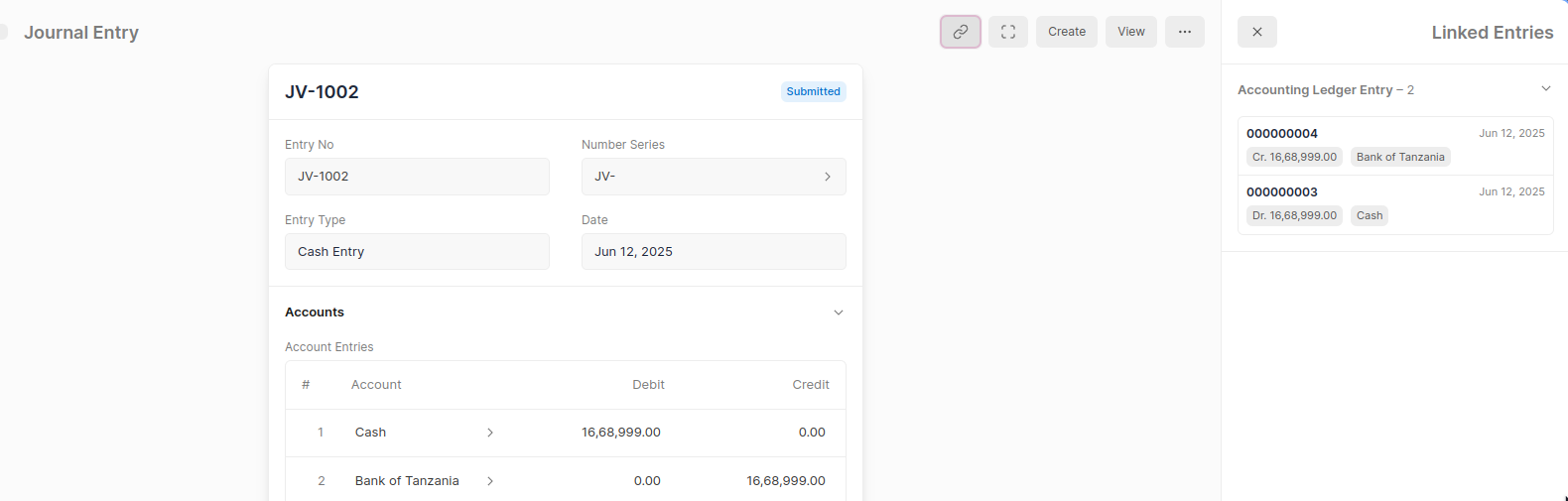
On Submitting a few options become available such as Ledger Entries
Checking Ledger Entries
Clicking on Ledger Entries from the link button will display the accounts that have been affected by this transaction in the General Ledger.
Cancelling an Entry
A saved entry when cancelled will be automatically deleted.
Cancelling a Saved Entry
When you cancel a saved entry, it will be deleted automatically, and it is PERMANENT.